Professional Projector Rental in Chapel Hill for Events
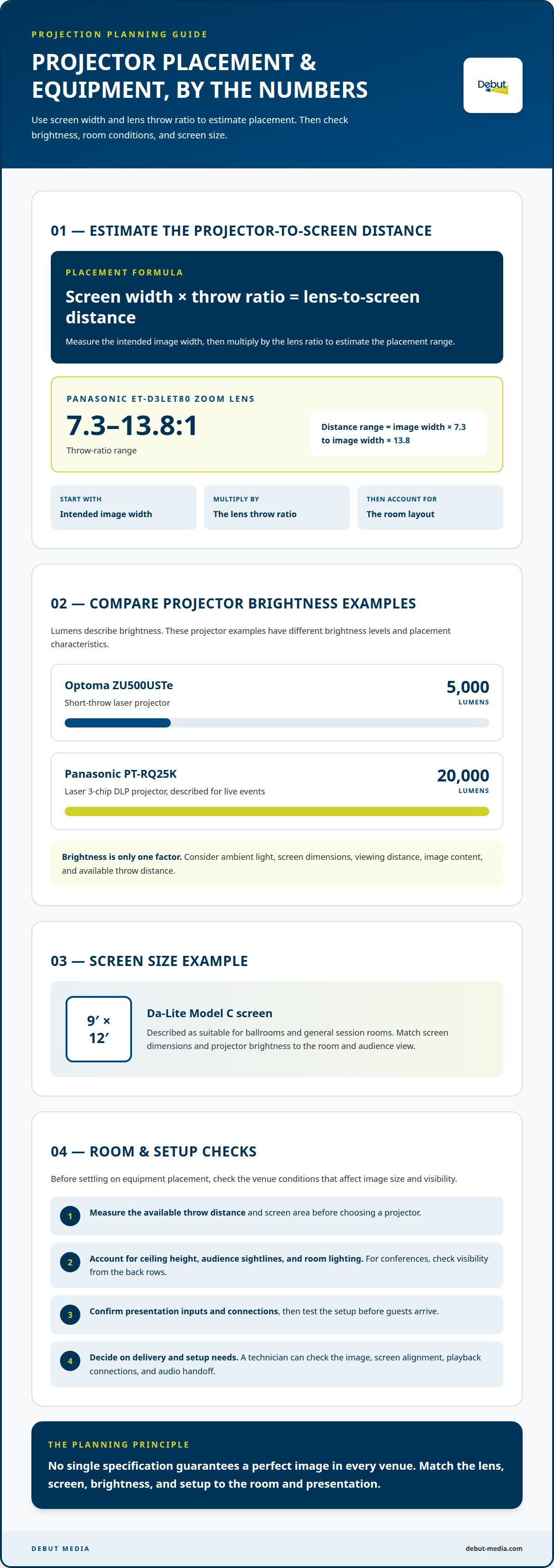
Projector-to-screen distance isn’t one fixed measurement: it depends on screen width and the lens’s throw ratio. For a professional projector rental, multiply the screen width by the projector’s throw ratio to estimate placement. The Panasonic ET-D3LET80 zoom lens, for example, has a 7.3-13.8:1 ratio.
It’s easy to focus on the projector, but a clear, properly sized image also depends on the room layout, screen dimensions, and placement. Knowing the throw ratio helps you plan the projector’s position instead of guessing at the distance.
This guide explains how to work out projector-to-screen spacing and what to consider when choosing equipment for a Chapel Hill venue. You’ll also learn about projector and screen options, delivery, setup, and event support, so you can plan the AV details with greater confidence.
Table of Contents
How much distance do I need between the projector and screen?
Calculate projector placement from the screen width and lens throw ratio. The Panasonic ET-D3LET80 zoom lens has a 7.3-13.8:1 ratio. That means the lens-to-screen distance ranges from 7.3 to 13.8 times the image width. Multiply your intended image width by the ratio to estimate the placement range, then account for the room layout.
For a business presentation in Chapel Hill, measure the available throw distance and screen area before choosing a professional projector rental. A projector placed too close or too far may not fill the screen as intended. Ceiling height, audience sightlines, and room lighting also affect the setup. For conferences, make sure the screen will be visible from the back rows.
Where can I rent a professional projector near me? For an event in Chapel Hill, Debut Media AV and Production provides projector and screen rentals for corporate events. Share the venue details and presentation needs so the equipment plan can suit the room.
How far in advance should I book a projector rental? Set the date and venue first, then plan the equipment once you know the screen size and room setup. A busy event schedule or a more involved setup can affect how much planning is needed.
What insurance, deposit, and damage policies apply? Review the rental agreement for deposit, insurance responsibilities, damage terms, and return conditions before accepting the equipment.
To get a useful quote, provide the event date, venue, screen dimensions, audience layout, presentation connections, rental period, and setup needs. Clarify the rental dates and event schedule.
Common problems include incorrect placement, poor visibility, and connection issues. Measure the room, consider ambient light, confirm presentation inputs, and test the setup before guests arrive. Popcorn and FM transmitters are separate event add-ons; include their space and equipment needs in the room plan.
Rental delivery, setup, and on-site technical support
Start with the venue’s access details: delivery entrance, loading instructions, room access time, and presentation start. Share these details when planning AV support so setup fits the event schedule. For a conference, include when the room becomes available and when the screen must be ready.
Decide whether you need equipment-only delivery or help positioning and testing it. A technician can check the projector image, screen alignment, playback connections, and audio handoff before guests arrive. Match projector brightness to the room, too. For example, the Optoma ZU500USTe short-throw laser projector is listed at 5,000 lumens.
Plan equipment removal as carefully as setup. Clarify who disconnects and packs the equipment, when it leaves the venue, and whether the rental period includes setup or strike. These details help prevent a projector or screen from being left behind during a fast room change.
Shipping rentals need a clear return plan. If the agreement uses UPS for returns, follow its stated packing and handoff instructions, and note the drop-off deadline. Keep the packaging until the equipment is ready to go back. Compare that workflow with local delivery and pickup when timing or venue access is tight. For event-specific projector and screen rental planning, include delivery, setup, technical support, and return needs in one request.
What types/brands of projectors and screens do you offer?
Choose equipment by matching the image size, venue conditions, and presentation needs. Projector and screen specifications can help determine whether the setup suits the room.
Projector Brand Options
Panasonic and Optoma models illustrate different approaches to event projection. The Panasonic PT-RQ25K is a 20,000-lumen laser 3-chip DLP projector described for live events. The Optoma ZU500USTe is a 5,000-lumen short-throw laser projector. These examples help compare brightness and placement needs, rather than treating brand name alone as the deciding factor.
For corporate presentations, note the content type, image size, and available throw distance. A short-throw projector may suit a room with limited placement options, while a high-lumen projector can be considered for a larger event space. Share these details with Debut Media so the equipment plan reflects your venue and presentation.
Brightness for Venue Size
Lumens describe projector brightness, but venue size isn’t the only factor. Ambient light, screen dimensions, viewing distance, and image content all affect visibility. Compare the 5,000-lumen Optoma ZU500USTe with the 20,000-lumen Panasonic PT-RQ25K as examples, then weigh those figures against the room and presentation.
Screen choice matters, too. A Da-Lite Model C screen measures 9′ x 12′ and is described as suitable for ballrooms and general session rooms. Share the room layout and intended audience view, then match screen dimensions and projector brightness to those conditions. No single specification guarantees a perfect image in every venue.
Debut Media AV and Production: Audio Visual Services
For a Chapel Hill meeting or event that needs projection and audio, Debut Media provides Corporate AV services, including Projectors & Screens and Audio Solutions. Planning these together helps align the image and sound with the room and presentation. For clear speech, include your microphone and audio needs in the same request.
Debut Media’s corporate event AV services can bring multiple AV needs into one production plan. Share the event format, venue layout, presentation requirements, and audio needs to help shape a practical equipment setup. AV production supports your program, while your team remains responsible for the event schedule and content.
Contact Debut Media AV and Production to discuss projector, screen, and audio needs for your event.
Shape the AV plan around your audience
Your next step is to turn the presentation plan into a room-ready brief. Decide what attendees need to see and hear, where the presenter will stand, and how the screen fits the room’s layout. This ties equipment choices to the experience you want to create rather than treating each item as a separate decision.
A professional projector rental is most useful when it supports the full presentation plan, from the opening slide to the final speaker handoff. Share your event format, venue details, and presentation priorities to keep the planning conversation focused on your goals.
With a clear brief, your team can move toward event day with a shared understanding of what the visual setup needs to accomplish. A thoughtful plan is a strong start to a smooth presentation.
Set your next presentation up to look clear, composed, and ready for its audience.
Frequently Asked Questions
What types of professional projectors are available for rent?
Options include high-lumen projectors, laser models, and short-throw configurations, paired with screens sized for the presentation. The right type depends on the room, image size, placement limits, and content. For example, a short-throw setup can help when the projector must sit closer to the screen. Share your venue layout and presentation format to guide equipment planning.
How much does it cost to rent a professional projector per day or week in the United States?
Rental pricing depends on the equipment, rental period, and services included, and is provided after a quote request. A package with a screen, setup, or technical support differs from an equipment-only rental. Debut Media provides quotes based on bundled gear and services, with multi-day discounts built into pricing. Include your dates and event requirements to receive a quote for your project.
What projector specifications are needed for conferences, outdoor events, and large venues?
Choose specifications based on ambient light, screen size, audience sightlines, and projector placement. A large venue or bright setting calls for careful attention to brightness; a Panasonic PT-RQ25K is an example of a 20,000-lumen live-event projector. For outdoor events, account for changing light and viewing conditions. Also match the image size to the space and audience layout.
What is included with a professional projector rental, such as lenses, cables, screens, and setup?
What a rental includes depends on the equipment and services in your quote. Debut Media provides projector and screen rentals, along with technical setup, on-site operation, and equipment strike for event AV rentals. Your quote outlines the equipment and services included. If you’ll use a separate playback device, include its connection requirements in your event brief.
What are the delivery, installation, and pickup options for projector rentals?
For events in Chapel Hill, Raleigh, and Durham, plan equipment access around venue loading instructions, room access, and the program schedule. Technical setup, on-site operation, and equipment strike can be part of Debut Media’s event AV support. Include these timing needs in your request so setup and removal can fit the venue’s schedule.