Fast-Fold Screen Rentals for Durham Presentations
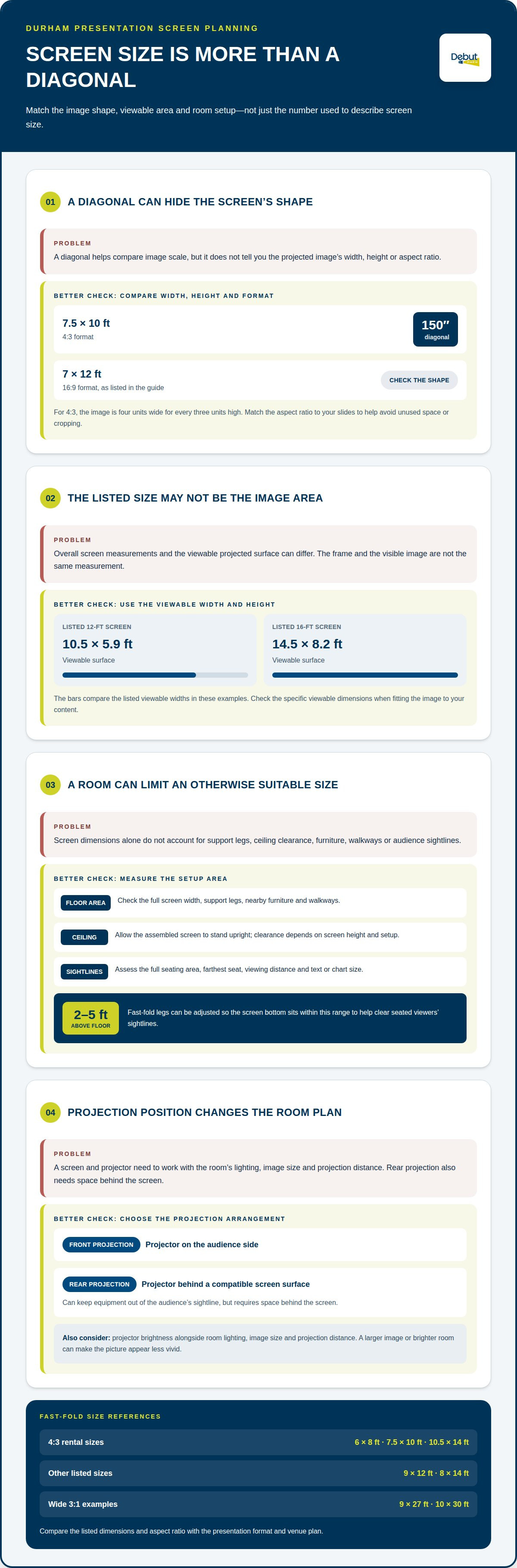
The diagonal isn’t the whole screen story. For Durham presentations, fast-fold screen rental sizes include 4:3 options such as 6 by 8 feet, 7.5 by 10 feet, and 10.5 by 14 feet. A 7.5-by-10-foot 4:3 screen has a 150-inch diagonal, while a 7-by-12-foot screen uses a 16:9 format.
It’s easy to focus on a large diagonal, but the screen’s shape and viewable area matter just as much when you’re matching it to your slides and room. This guide explains how 4:3 dimensions compare with Da-Lite screen measurements, why diagonal figures can be confusing, and which details help you narrow down a practical size. You’ll leave with a clearer way to assess screen proportions and plan a presentation setup without getting lost in the numbers.
Table of Contents
4:3 Fast-fold projection screen rental sizes
A 4:3 image is four units wide for every three units high, so its shape suits presentation content made for that proportion. Fast-fold screen rental sizes in this format include 6 by 8 feet and 10.5 by 14 feet. The first gives a smaller viewing area; the second provides a broader image for a room with wider seating. Match the screen shape to your slides to avoid unused space or image cropping.
How do fast-fold screen rental sizes compare with inflatable and tripod screens? A fast-fold screen uses a self-supporting frame, an inflatable screen relies on an inflated structure, and a tripod screen rests on a stand. The frame-based format can suit a formal presentation. Choose based on the room layout and transport needs.
How many people can each size serve? Screen dimensions alone don’t determine a reliable audience count. Seating distance, room width, sightlines, and text or chart size all affect readability. Before choosing a format, assess the farthest seat and the full seating area.
The front-projection surface is white matte with a black border. For front projection, place the projector on the audience side; for rear projection, position it behind a compatible screen surface. Rear projection can keep equipment out of the audience’s sightline, but it needs space behind the screen. Consider projector brightness alongside room lighting, image size, and projection distance. A larger image or brighter room can make the picture appear less vivid, so screen dimensions and setup need to work together.
Fast-fold legs can be adjusted so the screen bottom sits 2 to 5 feet above the floor. This adjustment helps clear seated viewers’ sightlines; set the screen height to suit the room and seating plan.
Da-Lite Fast Fold screen dimensions
Da-Lite listings use several measurements, so distinguish the image area from the screen’s outside dimensions. In a Durham room, compare both with the available floor area and ceiling height before choosing a format.
Viewable Surface Measurements
The viewable surface is the area that displays the projected image, not the full frame. A listed 12-foot fast-fold screen has a viewable surface measuring 10.5 feet wide by 5.9 feet high; a 16-foot screen measures 14.5 feet wide by 8.2 feet high. These examples show why the advertised screen size and visible image dimensions may differ. Use the viewable width and height to judge how the image fits your content.
Overall Screen Dimensions
Overall measurements describe the screen size as listed, rather than just its projected image. Da-Lite Fast Fold options include 9 by 12 feet and 8 by 14 feet. The Da-Lite Fast-Fold Deluxe system also has a 16:9 aspect ratio, while a listed 7.5-by-10-foot screen uses 4:3 and has a 150-inch diagonal. Compare the listed dimensions and aspect ratio with your presentation format before choosing.
Floor Space Requirements
How much floor space and ceiling height does each screen size require? The listed dimensions give the screen’s width and height, but the room must also accommodate its support legs and setup. A 9-by-12-foot screen needs room for its full width, while the ceiling must allow the assembled screen to stand upright. Measure the intended position, including nearby furniture and walkways, then compare that space with the screen dimensions. The ceiling clearance depends on the screen’s height and chosen setup.
Fast-fold screen sizes and diagonal measurements
A diagonal is useful for comparison, but it doesn’t describe the screen’s shape or width. Consider that measurement alongside aspect ratio and venue layout to find a workable fit.
Diagonal Measurement Options
Diagonal measurements run from one corner of the viewable image to the opposite corner. Screen listings may describe size by diagonal, so compare that measurement with the listed width and height. Those figures help compare image scale, but they don’t tell you how wide or tall the projected area is. Check the listed width, height, and aspect ratio too, especially when matching the screen to presentation slides.
Choosing a Size for the Venue
How do you choose a fast-fold screen size for an event venue? Start with the room’s usable width, ceiling clearance, seating layout, and farthest viewing position. Match the screen shape to the content, then check that the projected image is clear from the back of the room. A large diagonal alone doesn’t account for obstructions, sightlines, or setup space.
Sizes Available from Rental Companies
Rental listings offer fast-fold options in different aspect ratios and sizes. Wider 3:1 formats include 9 by 27 feet and 10 by 30 feet. These examples show how available sizes vary by aspect ratio and intended image shape. For a Durham event, compare the listed dimensions with your venue plan, then select a format that suits both the content and room.
Debut Media AV and Production: Projector and Screen Rentals
Debut Media provides projector and screen rentals for presentations where screen dimensions need to suit the room and projection setup. Share the venue layout, presentation format, and planned screen position to align the equipment with your event.
If your presentation also needs clear speech, Speaker and Microphone Rental can support the room’s audio setup. Coordinating projectors, projection screens, and audio equipment brings key presentation elements together without requiring you to manage unrelated rental details.
Contact Debut Media AV and Production to discuss projector and screen rentals for your Durham presentation.
Bring Your Screen Plan Together
Your screen choice works best when it fits the presentation, room, and supporting equipment as one plan. Before deciding, gather the venue layout, seating arrangement, and presentation format. These details help turn your comparison of fast-fold screen rental sizes into a clear setup plan, rather than a choice based on diagonal alone.
Debut Media can match your screen requirements with its Audio Visual Services and AV Corporate Event Production Services. Projector and Screen Rentals support presentations where the screen and projection setup need to work together. If your event also needs audio, Speaker and Microphone Rental can support that part of the setup.
When the room details and presentation goals are aligned, you can move toward an organized setup that’s ready for the audience.
Frequently Asked Questions
What are the standard fast-fold screen rental sizes?
There isn’t one universal size; rental listings include several dimensions and formats. Examples include 6 by 8 feet and 7.5 by 10 feet in 4:3, plus 7 by 12 feet in 16:9. Wider 3:1 options include 9 by 27 feet. For a Durham venue, compare the image shape and screen footprint with your content and room layout.
What are the dimensions and aspect ratios of rental fast-fold screens?
Listings give screen dimensions as width by height and identify the aspect ratio separately. For example, 7.5 by 10 feet corresponds to 4:3, while 7 by 12 feet corresponds to 16:9. Da-Lite listings also include 9 by 12 feet and 8 by 14 feet. Treat listed frame or screen dimensions separately from the viewable image area.
What fast-fold screen sizes are available for 16:9 presentations?
Rental listings may offer fast-fold screens in different aspect ratios and sizes; check availability for your event. Larger examples include a 12-foot screen with a 10.5-by-5.9-foot viewable surface and a 16-foot screen with a 14.5-by-8.2-foot viewable surface. Compare the visible image area with your presentation content and seating plan.
What fast-fold screen sizes are available for 4:3 presentations?
Examples of 4:3 fast-fold sizes include 6 by 8 feet, 7.5 by 10 feet, and 10.5 by 14 feet. The 7.5-by-10-foot format has a 150-inch diagonal. These dimensions give different image widths while retaining the same proportion, making them useful when existing slides are designed in 4:3. Check the viewable area for content fit.
How many people can each fast-fold screen size serve?
Screen dimensions alone don’t determine a reliable audience count. Consider seating distance, room width, sightlines, and text or chart size, especially at the farthest seat.