Conference Sound Systems for Clear Speech in Raleigh
Clear speech in a Raleigh conference room starts with a sound system matched to the space, not simply louder speakers. Choosing sound systems and speakers for conferences means considering room size and layout, background noise, microphone needs, and where sound must reach.
Participants should be able to hear the speaker without strain or distracting noise. The right setup accounts for how sound travels through the room and how people will speak, whether they’re presenting at the front or joining remotely. Custom system design, careful speaker placement, and effective noise management can all support clearer speech. Room and event details guide equipment choices and make the technical plan easier to manage.
Table of Contents
Need a Custom Conference Room Sound System?
A custom setup matches speaker coverage and microphone needs to the room dimensions, seating, and meeting format. The layout also guides equipment placement, wireless connections, and accessibility planning.
Room Size and Seating Layout
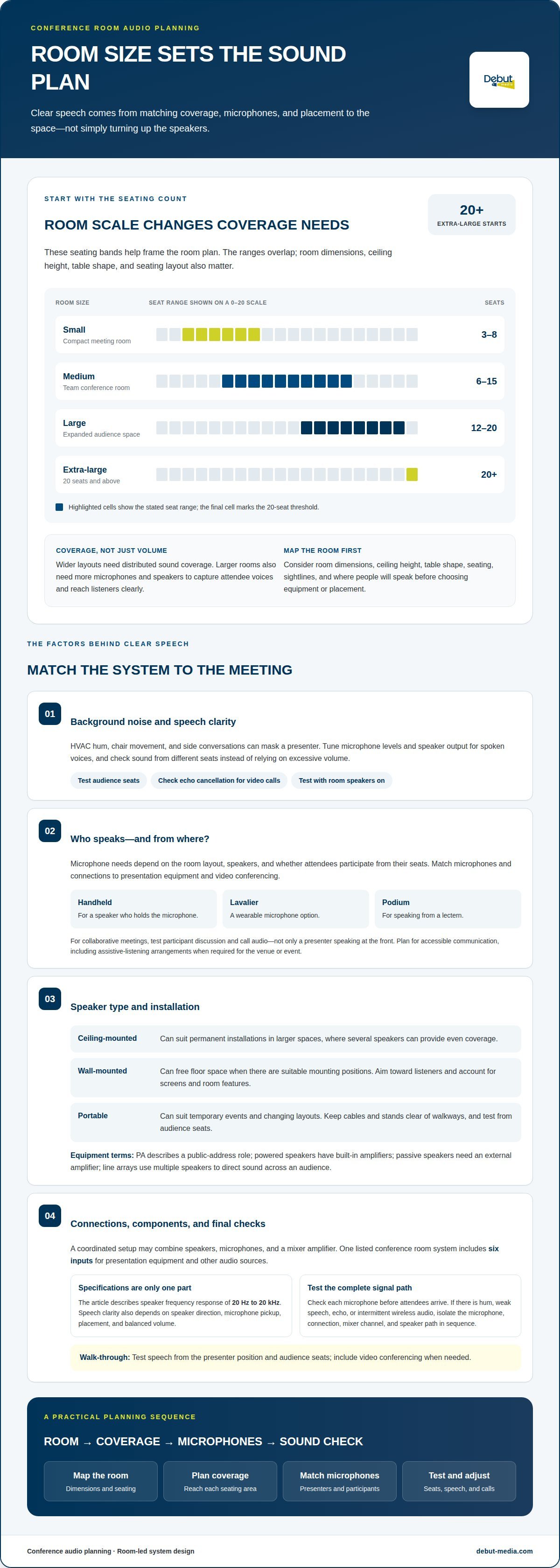
Professionals map room dimensions, ceiling height, table shape, and seating before selecting each conference room speaker. A small room may seat 3-8 people, while medium rooms seat 6-15; large spaces seat 12-20, and extra-large rooms start at 20+ seats. Wider layouts need distributed coverage, not simply more volume. Larger rooms also need more microphones and speakers to capture attendee voices and reach everyone clearly.
Preconfigured Packages and Equipment Needs
Preconfigured packages group speakers, microphones, and a mixer amplifier into a coordinated system. One listed conference room system includes six inputs for presentation equipment and other audio sources. A complete setup may also need microphones and connections for video conferencing. Renting suits events with changing room needs, while buying can suit repeated use. Wireless speakers offer flexible placement, but reliable connections matter; discreet mounting can also preserve room aesthetics.
Speaker Types and Durability
PA describes a system’s public-address role; powered speakers have built-in amplifiers, while passive speakers require an external amplifier. Line arrays use multiple speakers to direct sound across an audience. The right type depends on room size, coverage, and event format. For portable setups, account for transport and placement. Fixed installations should suit the room without obstructing sightlines.
Microphone Compatibility and System Components
Microphone needs depend on room layout, who will speak, and whether attendees need to participate from their seats. A system may combine handheld, lavalier, or podium microphones with a mixer amplifier and suitable speaker connections. Match those components to presentation sources and video conferencing equipment. U.S. venue planning should also account for accessible communication, including assistive-listening arrangements when required for the venue or event.
Background-noise suppression and speech clarity
Clear speech depends on balancing microphone levels, speaker output, and room noise. HVAC hum, chair movement, and side conversations can mask a presenter, even when the system is loud. A professional tunes the mixer for spoken voices and checks sound from different seats. This helps maintain consistent clarity without relying on excessive volume.
For collaborative meetings, microphones need to capture voices beyond the presentation area. Test participant discussion and video conferencing, not just a presenter speaking at the front. Echo cancellation can improve clarity and reduce feedback during video calls. The technician should test call audio with the room speakers on, then adjust the setup if remote voices echo or sound too quiet.
Frequency response also shapes speech intelligibility. Conference room speakers should cover 20 Hz to 20 kHz, a range that supports deep bass and clear highs. But specifications alone don’t make speech understandable. Professionals assess speaker direction, microphone pickup, and volume together. If one seat sounds harsh while another sounds faint, they adjust placement or levels to better balance the meeting spaces.
To prevent feedback, position microphones away from speaker output, set mixer levels, and test each microphone before attendees arrive. Common problems include hum, weak speech, echo, and intermittent wireless audio. Troubleshoot by isolating the source: check the microphone, connection, mixer channel, and speaker path in sequence. A final walk-through should test speech from the presenter position and audience seats, with video conferencing active when needed.
Ceiling-mounted, wall-mounted, and portable speakers
Speaker mounting should follow room use, sightlines, and how sound needs to reach each seating area. Professionals assess the stage, tables, ceiling, and audience positions, then place speakers to distribute speech evenly without blocking screens or views.
Ceiling-mounted speakers suit permanent installations in larger spaces, where several units can provide even coverage. A conference system featuring an SD5 SuperDispersion ceiling speaker array, an RMA240BT 240W mixer amplifier, and 8 discussion microphones is described as providing 360° vocal clarity. That example shows how an array can support discussion across a room, not just sound from the front.
Wall-mounted speakers can free up floor space when the room offers clear mounting positions. Direct them toward the audience and integrate them with the existing AV setup. Account for screens, room features, and microphone positions so sound reaches listeners without creating distracting hotspots.
Portable speakers make sense for temporary events or spaces with changing layouts. Their placement can shift with the stage and seating plan, while cables and stands need to stay clear of walkways. During setup, a technician tests speech from audience seats and adjusts speaker direction and levels. For live streaming, the room speaker layout should also work with the event’s audio connections, rather than competing with microphones.
Debut Media AV and Production: Speaker and Microphone Rental
Debut Media provides speaker and microphone rentals for conferences that need a coordinated audio setup for the room layout, audience participation, or presentation format. Its sound systems and speakers for conferences, meetings, and galas can be paired with wireless, handheld, lavalier, or podium microphones suited to the event.
When an event also needs presentation visuals, Projector and Screen Rentals can support the same room setup. Debut Media’s Audio Visual Services bring sound and presentation equipment together, helping keep components aligned. This is a practical option when you want professional support instead of sourcing microphones, speakers, and other event equipment separately.
To discuss speaker and microphone rental for your Raleigh conference, contact Debut Media AV and Production.
Plan Your Next Conference with Confidence
Start by turning the room’s purpose into a clear production plan. Consider how attendees will participate, whether presentations need projection, and how in-room and remote speakers will connect. These priorities help shape sound systems and speakers for conferences around the experience you want attendees to have, not just an equipment list.
Debut Media can support a broader event setup through Audio Visual Services, Projector and Screen Rentals, and AV Corporate Event Production Services. This coordinated approach helps when spoken content needs to work alongside presentations and other production elements. Clear priorities make it easier to plan a cohesive experience for presenters and attendees.
With a clear plan and professional production support, your Raleigh conference can feel organized from the opening remarks through the final discussion.
Frequently Asked Questions
How do you choose a provider for conference room speakers?
Choose an AV partner whose equipment rental and technical support cover the event’s audio needs. For a Raleigh conference, share the agenda, room layout, presentation format, and whether the event includes a panel or remote participants. These details help match speakers and microphones to the program and coordinate audio with presentation equipment.
How do professionals choose conference room speakers based on room size and audience?
Consider the room’s dimensions alongside how the audience will use the space. A presentation to seated attendees has different coverage needs from a panel with speakers taking turns or a meeting with audience questions. Account for sightlines and room features that could block sound, then assess coverage from several listener positions before finalizing speaker placement.
What are the best conference sound systems and speakers in 2026?
The best system in 2026 is the one that fits the venue, event format, and audio workflow. A fixed conference room used for recurring presentations may suit a different configuration from a temporary event with a changing stage layout. Consider how presenters and audience members will speak, and whether the system must connect with video conferencing or presentation equipment. There isn’t one setup that fits every Raleigh event.